Jump to:
- NIH Biographical Sketch & Other Support Common Form Requirement
- Faculty: Prepare for the Transition
- Form Instructions
- Biosketch Common Form Changes
- Current and Pending (Other) Support Changes
- Uploading Common Forms to RMS or eRA Commons
- Research Administrators: Prepare for the Transition
- Resources
NIH Biographical Sketch & Other Support Common Form Requirement
Use of the Common Forms for Biographical Sketch, Current and Pending (Other) Support is now required for NIH submissions.
The NIH recently announced a leniency period where a warning will be generated if the incorrect form is used, but the application will still be considered. This is expected to end in May 2026 when applications using the wrong version of the forms will be withdrawn.
Key Changes
- Documents must be completed in SciENcv
- Form sections are renamed and re-ordered. Information may be entered into a different section of the form. Review the NIH Notice and WashU’s resource page for details.
- Form sections have new citation, entry, or character limits. For example: The Products section of the Biosketch now allows only five product citations closely related to the proposed project and an additional five citations that highlight other significant contributions to science. A narrative (no citations) for the products can also be provided on the Personal Statement. Review the table on the NIH Notice that addresses changes section-by-section.
- Each document requires the individual to certify that the information is complete and accurate.
Faculty: Prepare to use SciENcv
- Obtain an ORCID ID. Please see the Becker Library resources guide for instructions on how to set up your account.
- In eRA Commons:
- Link your ORCID iD to your eRA Commons accounts. This is required by the NIH for both forms.
- Review and update your personal profile. Data such as title and contact information will import into SciENcv forms.
- Create a SciENcv account,
- Ensure your eRA Commons account and ORCID iD are linked to your NCBI account. This is managed in the NCBI Account Settings.
- Add delegates to allow administrators to enter data in SciENcv on your behalf. Individuals must have a SciENcv account before they can be added as a delegate.
- Complete your Profile in SciENcv and confirm your ORCID iD displays.
- To create a form in SciENcv:
- Select the New Document button
- Select document type
- Continue to create the document using one of the data source options.
Form Instructions
The NIH Common forms (Biosketch, Biosketch Supplement, and Current and Pending (Other) Support) are available in SciENcv. Instructions are available for each form:
- Biographical Sketch Common Form (includes the NIH Biographical Sketch Supplement)
- Current and Pending (Other) Support (CPOS) Common Form
When completing the forms:
- Start early. There have been reports of issues with accessing and using the forms. Begin the Common Forms well ahead of the submission deadline to allow for time to address issues and submit tickets to the NCBI help desk if needed.
- Confirm your ORCID iD displays in the Persistent Identifier (PID) section of the Common Forms.
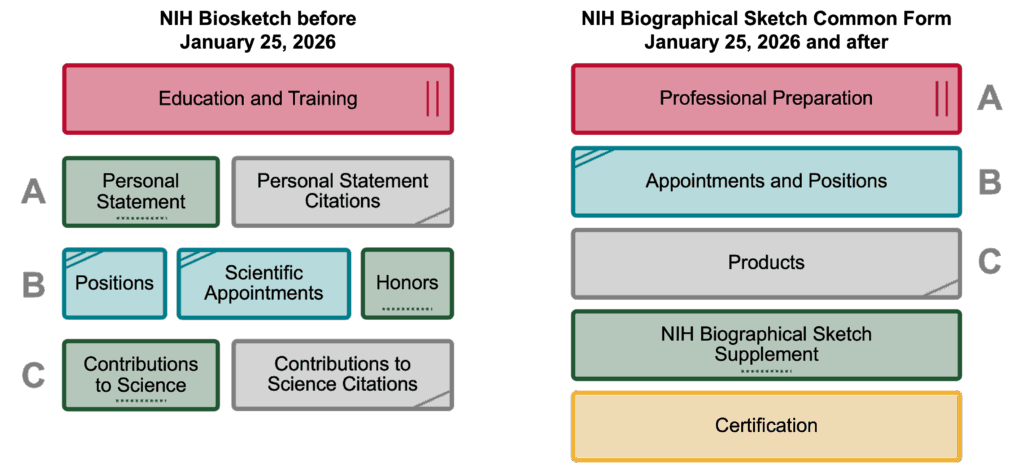
Biosketch Common Form Changes
- NIH will no longer accept the NIH Biographical Sketch format page.
- The NIH Biographical Sketch Supplement section collects the “Personal Statement,” “Contributions to Science,” and “Honors” statements.
- Sections of the document have new names.
- Information may be required in a different area of the form.
- NIH is working on adding more text formatting options to the Biosketch, but has confirmed you can use the HTML tag <br> to create a new line in the meantime. Use <br><br> to enter a blank line. This tag counts toward the character limit.
The individual must certify that the information is complete and accurate.
NOT-OD-26-018: NIH’s Implementation of Common Forms for Biographical Sketch and Current and Pending (Other) Support for Due Dates on or after January 25, 2026 lists notable changes for the Biosketch:
| Current NIH Biosketch | Biographical Sketch Common Form | NIH Biographical Sketch Supplement |
|---|---|---|
| Education/Training | Professional Preparation | Not Applicable |
| A. Personal Statement: Narrative and 4 product citations. | Products: Products Most Closely Related to the Proposed Project, limit 5 citations. | Personal Statement: No citations allowed. Can provide narrative for Personal Statement including information on the Products Most Closely Related to the Proposed Project, cited in the Products section of the Biographical Sketch Common Form. Field is limited to 3,500 characters. |
| B. Positions, Scientific Appointments and Honors | Appointments and Positions: Must only identify all domestic and foreign professional appointments and positions outside of the primary organization for a period up to three years from the date the applicant submits the application to the agency for funding consideration. | Honors: Limited to no more than 15 entries. |
| C. Contributions to Science: Up to 5 narrative contribution descriptions, each allowed to include citations for up to 4 products. | Products: Can provide up to 5 other significant products that highlight the senior/key person’s Contributions to Science. The NIH Biographical Sketch Supplement will provide the opportunity to describe these contributions in more depth. | Contributions to Science: No citations allowed. Can provide up to 5 narrative contributions to science. Each entry is limited up to 2,000 characters. You may refer to products listed in the Other Significant Products section of your Biographical Sketch Common Form that are relevant to the contributions described in this section. |
Current and Pending (Other) Support Changes
| Current NIH Other Support | Current and Pending (Other Support) Common Form |
|---|---|
| Person Months:Effort is classified as either calendar or academic/summer months. | Person-Month(s) (or Partial Person-Months): Effort is classified only in person months not calendar or academic/summer. For example: an individual’s effort currently expressed as 1.2 calendar months, or 0.9 academic and 0.3 summer would be expressed as 1.2 person months on the Current and Pending (Other) Support Common Form. |
| Major Goals: | Overall Objectives: The field label changed, and the field is limited to 1,500 characters. |
| Estimated Dollar Value of In-Kind Contribution: An estimate always needed to be reported regardless of time commitment or dollar value. | US Dollar Value of In-Kind Contribution: The field label changed and an In-Kind Contribution should only be reported if estimated at $5000 or more and requires a commitment of the individual’s time. |
| Overlap Section: Currently Overlap is summarized at the end of the document rather than for each Other Support Entry. | Statement of Potential Overlap: Each Proposal, Active Project or In-Kind Contribution entry will have its own Statement of Potential Overlap rather than being summarized at the end. |
| Supporting Documentation:Currently, provided/appended as a PDF following the Other Support form. | Supporting Documentation:This document will not be attached to the Current and Pending (Other) Support document produced in SciENcv. It will be attached in a separate field alongside the Current and Pending (Other) Support document when submitting via the Just-In-Time, RPPR, or Prior Approval modules. |
Uploading Common Forms to RMS or eRA Commons
eRA Commons has been updated to require submission of Common Forms. Reference the eRA Enhancements: Changes to Prior Approval, Just-in-Time, and RPPR to be Released Monday, January 26, to Align with New Common Forms Requirements posting for more information.
RMS has matching validations to eRA Commons. If you created a System-to-System records before RMS was updated, you must reselect the NOFO to activate the validations.
Attaching the PDFs
- Download the certified Common Forms from SciENcv
- Delegates can also download certified forms
- If necessary, edit the name of the downloaded file. Do not make any changes to the PDF.
- Do not flatten the PDF of the Common Forms.
- Upload to the correct section in eRA Commons o RMS.
- Changes for Prior Approval – Change of PD/PI Request
If the PD/PI has Supporting Documentation that needs to be reported with their CPOS (e.g., copies of contracts specific to foreign appointments and/or employment with a foreign institution), uploaded this separately as a flattened PDF file in the Foreign Contract Document attachment field.
Changes for JIT
- If a Foreign Contract Supporting Document is needed, upload it separately as a flattened PDF file.
- A new Biographical Sketch Common Form, Current and Pending (Other) Support Common Form, and Foreign Contract CPS section will be available for all JITs.
- This section allows users to add Senior/Key personnel. For each added person, enter eRA Commons User ID, ORCID ID, and Name.
Changes for RPPR – Participants Section
The RPPR Participants section will be updated to move questions related to New Senior/Key Personnel, Changes in Senior/Key Personnel Current and Pending (Other) Support, and New Other Significant Contributors (currently Questions D.2.b, D.2.c, and D.2.d respectfully) into the Participant Modal. The modal will responsively present questions and require file uploads based on the users’ answers
The participant modal will now accept values of 0.0 person months to accommodate the inclusion of New Other Significant Contributors in the list of Participants, who by definition do not contribute any measurable effort.
Research Administrators: Transition to SciENcv
- Create your own SciENcv account. This is required for you to be added as a delegate.
- From the login screen, select More Options
- Select More login options
- Search for Washington University in St. Louis
- Continue with account set up
- Ensure faculty have ORCID ID and SciENcv accounts set up.
- Encourage faculty to assign you access in SciENcv.
- Note: Staff must click on the delegate email received from SciENcv within three days of receipt to avoid the faculty member having to complete this a second time. Recent tests confirm that this functionality is still working.
- Delegates can only generate PDFs for certified documents. If the document is not certified, the delegates sees the Certification Required warning.
- Encourage faculty to update profiles in eRA Commons. Cleaning up the information in eRA Commons now will result in better data importing into the Biosketch form.
- Ensure all senior/key personnel complete Current and Pending (Other) Support Training.
- Create and/or update faculty’s information in RADAR.
- Test exporting data from RADAR and importing into SciENcv. Instructions are provided in the RADAR section below.
- Provide an overview of key changes to faculty within your department (resources available below).
- Review the instructions for the NIH Common Form Instructions (links available above).
RADAR – Research Administrators Data and Reporting
SciENcv will allow for import of Current and Pending (Other) Support from RADAR.
- Data can be exported out of RADAR into SciENcv.
- Select a report in NIH Other Support Report.
- Click Preview Report at the bottom.
- Click Export.
- Click Export for SciENcv (XML).
- On Microsoft Edge, the file will be automatically saved into your download folder on your C: (default location).
- On Chrome, a new window may pop up asking for the location to save the file.
NIH Resources and Guidance
- NIH’s Implementation of Common Forms for Biographical Sketch and Current and Pending (Other) Support for Due Dates on or after January 25, 2026 [NOT-OD-26-018]
- NIH FAQs on Common Forms
- Common Forms for Biographical Sketch and Current and Pending (Other) Support
- Other Support page
- Biographical Sketch Common Form
- Biographical Sketch Supplement
- Current and Pending (Other) Support Common Form
- Disclosure Table
- NOT-OD-25-152 and NOT-OD-24-163
Featured Questions
Always check the NIH’s Common Forms FAQ page for the latest version of this information.
Q: NOT-OD-26-018 outlines the requirement that individuals serving as senior/key personnel must certify annually to their participation or non-participation in a Malign Foreign Talent Recruitment Program (MFTRP) by uploading a certification statement in RPPR Section G.1, Special Notice of Award and Funding Opportunity Announcement Reporting Requirements, as a flattened PDF file. What language should be used for the certification? Link to FAQ.
A: The certification statement language included in the RPPR must align with the statement within the Common Forms for Biosketch and Current and Pending (Other) Support, and state: I [insert name] certify that, at the time of submission, I am not a party to a malign foreign talent recruitment program.
The file for each senior/key person must be named ‘MFTRPcert_[Name].pdf’ without quotations, where ‘[Name]’ is the name of the senior/key person and the PDF must be flattened prior to upload. (NOT-OD-26-018)
Q: When required to provide a Biographical Sketch Common Form and/or updated Current and Pending (Other) Support Common Form in the RPPR, do current or new senior/key personnel also need to provide the annual certification statement regarding their participation or non-participation in Malign Foreign Talent Recruitment Programs (MFTRPs) in Section G.1? Link to FAQ.
A: No. senior/key personnel required to submit one of these forms in the RPPR do not need to also provide the annual certification statement related to MFTRPs in section G.1. The digital certification on their Biographical Sketch Common Form or CPOS Common Form will fulfill this requirement.
Note: During the current leniency period, through May 2026, if the senior/key person does not upload a digitally certified Common Form from SciENcv that clears all warning validations, then they will need to provide the annual certification statement in section G.1.
Q: When completing the Current and Pending (Other) Support Common Form, how do you report 0 person months effort? Link to FAQ.
A: SciENcv is currently working on an update to allow 0 person months effort to be entered on the CPOS Common Form. In the meantime, if you need to submit a CPOS document with 0 effort, you may take either of the following approaches:
- Use the old NIH Other Support Format Page or
- Use the CPOS Common Form, enter 0.01 person months effort in the field, and provide a statement in the Overall Objectives clarifying the 0.01 effort in year [YYYY] is actually 0.00.
Q: Will Grant applications submitted for due dates on or after January 25, 2026 be withdrawn if they do not use the Common Forms?
A: Use of the Common Forms for Biographical Sketch, Current and Pending (Other) Support and NIH Biographical Sketch Supplement are required for application due dates and all JIT, RPPR, and Prior Approval submissions on or after January 25, 2026.
After evaluating the number and types of recent technical inquiries we received to both the SciENcv and eRA Service Desks, we recognize the difficulties these issues have had on the community’s ability to comply with the original timeline of January 25, 2026.
To allow for a period of leniency, NIH will provide a warning when the Common Forms are not used but will not withdraw applications that don’t comply with the use of the Common Forms. We expect the leniency to be in place through May 2026. NIH will issue a Guide Notice announcing the date when the validation will be changed to an error and the requirement to use the Common Forms will be system-enforced.
Q: What does NIH mean when you say that “senior/key persons must only identify all domestic and foreign professional appointments and positions outside of the primary organization for a period up to three years from the date the applicant submits the application to the agency for funding consideration?” Am I prevented from listing everything over three years old?
A: Professional appointments are formal appointments outside of one’s primary place of employment that are due to one’s professional expertise and generally temporary in nature. Common examples include editorial service for journals, serving on municipal, state, or federal advisory boards, and holding offices in professional societies. Senior/key persons must report on all professional appointments that have been active in the last three years. Professional appointments that concluded more than three years ago are not required to be reported on the NIH Biosketch Common Form but may be included if relevant to the specific application. By contrast, other types of appointments that are typically with one’s primary place of employment (i.e., academic and institutional appointments), must be listed for a period that covers the duration of one’s professional career.
WashU Resources and Guidance
- ORCID to NCBI Account Link Steps
- Becker Library: ORCID ID guide and instructional video
- Becker Library: NIH Biosketch and SciENcv session recording
- Becker Library: Implementation of Common Forms for NIH Biosketch and Current and Pending (Other) Support: Due Date on or after January 25, 2026
- SciENcv presentation from the Researcher Forum (recording reflects information from March 2025)
- STAR Hot Topic: Current and Pending (Other) Support slides and recording
- Slide deck on key changes for faculty